





















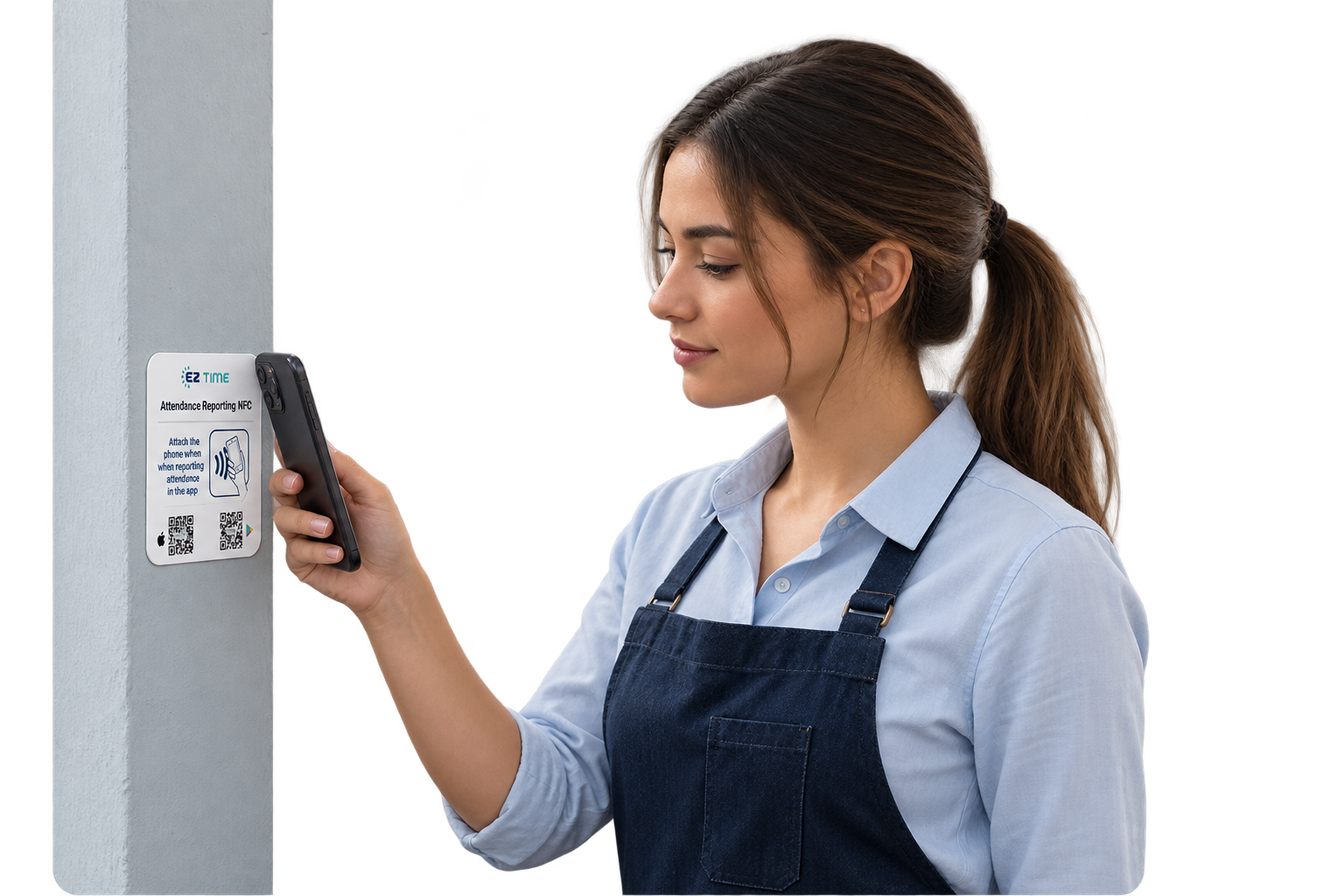
An NFC time and attendance system uses near-field communication as part of the employee clock-in process. In a phone-to-tag setup, an employee brings a compatible smartphone close to a workplace tag, and the attendance application handles the resulting action. The buying decision should cover the full workflow, including device compatibility, confirmation, exception handling, and manager review.
A quick demonstration can make the technology look simple, and the employee interaction can be simple. The more useful question is whether the complete process fits the workplace. A business needs to understand what employees must do, what managers receive, and how the organization handles a failed or incomplete attempt. Those details determine whether a convenient tap becomes a dependable attendance record.
Confirm Which NFC Workflow the Provider Offers
The term NFC can describe different arrangements. A system may involve employees tapping phones against fixed tags, or employees presenting cards to a reader. These are different purchasing and operating models. Before comparing prices, ask the provider to demonstrate the exact workflow included in the proposal.
For example, EZTime’s NFC time and attendance system uses the mobile app, a compatible NFC-enabled smartphone, and a tag at the designated work location. Employees open the app and tap at the tag. Managers review the resulting attendance records through the platform. A buyer should evaluate that phone-based experience with the devices and working conditions their employees will actually use.
Test Compatibility With the Real Employee Device Mix
A statement that a phone supports NFC is only the beginning of a compatibility check. Ask which operating system versions and devices are supported by the application. Test the required app state, employee login, phone settings, and scanning position. Use a small sample that represents the workforce rather than relying on a single demonstration phone.
The organization also needs a policy for employees who cannot use a personal device. Some may not have a suitable phone, while others work under rules that restrict phone use in certain areas. Identify an alternative attendance method before selecting the setup. The alternative should connect to the same review process so those employees do not become a separate administrative problem.
Examine the Location Where the Tag Will Be Installed
A fixed reporting point should be easy to find and safe to approach. Walk through the employee’s route at the beginning and end of a shift. Consider lighting, reach, signs, and whether people will stop in a busy doorway. The tag location should support the intended workflow without requiring employees to block an aisle or interrupt another activity.
Test the proposed mounting surface and position with the supplier’s recommended tag. Do not assume a successful desk demonstration proves performance at the final installation point. Include the ordinary conditions of the workplace, such as protective phone cases or employees carrying equipment. A small physical adjustment during the pilot can prevent repeated confusion after launch.
Ask What Proves That a Clock-In Succeeded
Employees need a clear confirmation after an attendance action. During the demonstration, ask what the employee sees when a record is accepted, rejected, or still awaiting completion. Also ask what managers can see and when. A phone reacting to a tag and a completed attendance record are separate events that the workflow should make understandable.
Test a repeated attempt as well. If an employee is uncertain and taps again, what happens? The answer should be demonstrated rather than inferred. The organization needs an instruction that employees can follow consistently, such as checking the confirmation or their recent record before retrying. That instruction reduces uncertainty at the reporting point and makes exception review more straightforward.
Understand Connectivity and Recovery Behavior
NFC describes the short-range interaction with the tag. It does not, by itself, establish how the attendance application communicates with a cloud service. Ask the provider what happens when a phone lacks connectivity and whether the specific application supports any offline workflow. If it does, test how records are presented and synchronized afterward.
If offline reporting is not part of the agreed setup, define the fallback. Employees should know how to record the actual start or end time through an approved alternative and whom to notify. Managers should know how to identify and reconcile those entries. An exception process is more useful than an assumption that every phone will always have a working connection.
Review Identity and Location Controls Without Overclaiming
A workplace tap creates a defined reporting interaction. It should not be treated as an unlimited guarantee about identity, security, or all activity during a shift. Ask how employee accounts are authenticated, how tags are assigned, and which additional controls are available in the proposed configuration. Request an explanation of what each control verifies and what it does not.
Also ask how administrators handle a damaged, moved, or replaced tag. The organization should know who can change its assignment and how employees will be informed. Avoid building a policy around claims such as “impossible to misuse.” A practical review focuses on documented controls, clear employee instructions, and a process for investigating unusual records.
Follow the Record Through Manager Review
The NFC interaction is one part of attendance management. After a record is created, a supervisor still needs to handle missing entries, employee questions, and corrections. Ask the provider to demonstrate a timecard with an incomplete day and show the steps required to resolve it. Check which details the reviewer needs and how the final record becomes ready for the next stage.
If payroll preparation is part of the requirement, verify the handoff separately. Use representative employee identifiers and reporting periods, then review the resulting format with the person responsible for payroll. A convenient capture method should feed a process the organization can reconcile. Do not assume that a general integration statement confirms compatibility with a particular payroll arrangement.
Compare Total Operating Requirements
List the items required to run the proposed setup: tags, application access, any necessary devices, configuration, training, support, and replacement procedures. Confirm which items are included in the commercial proposal. A tag without a power connection may simplify one part of installation, while the wider process still requires suitable phones, connectivity, and ongoing administration.
The evaluation should also include employee time. Observe how long it takes a new user to understand the instruction and complete the action, then note how often help is needed. These observations provide a local baseline. They are more useful than a vendor-neutral claim that one reporting method is always the fastest or cheapest for every workplace.
Make the Pilot a Decision Tool
Write a short acceptance list before testing. Include supported devices, the planned installation point, successful confirmation, an unsuccessful attempt, a repeated attempt, and a manager correction. Give each scenario an expected result and a person responsible for confirming it. Record any configuration changes before repeating the affected test.
At the end of the pilot, decide whether the setup meets the requirement, needs adjustment, or should be limited to certain teams. The outcome can be a mixed reporting model if that best fits the business. The goal is a process that employees can use and managers can maintain, with enough evidence to make the purchase decision confidently.
Frequently Asked Questions
Does an NFC system require a traditional time clock terminal?
A phone-to-tag setup can use employees’ compatible smartphones and workplace tags instead of a dedicated terminal. The exact device requirements depend on the provider’s workflow. Confirm them for the proposed deployment rather than applying one NFC product’s requirements to every system EZTime time clock app.
Can NFC replace manager review?
No capture method removes the need to address incomplete or disputed records. NFC can provide a convenient reporting action, while managers still need a clear process for questions, corrections, and approval. Evaluate those steps during the same pilot.
What should a buyer request in the demonstration?
Ask to see a real employee journey from login and tap through confirmation and manager review. Add a connectivity problem and a correction scenario. Providers such as EZTime can then explain how their specific setup handles the situations that matter to the workplace.